# Ustawienia - Archiwum SMS - Konfiguracja etykiet

<span style="color: rgb(226, 0, 116);">**Konfiguracja etykiet**</span> służących do oznaczania wiadomości w **Archiwum SMS.**

<p class="callout info"><span style="color: rgb(52, 73, 94);">Aby móc korzystać z **Etykiet** i samego **Archiwum SMS**, musi zostać zakupiona usługa **Archiwum SMS** ramach usługi **Platforma Głosowa.**</span></p>

**<span style="mso-ansi-language: PL;"><span style="color: rgb(226, 0, 116);"><span style="color: rgb(52, 73, 94);">Powiązane instrukcje:  
</span></span></span>**<span style="mso-ansi-language: PL;"><span style="color: rgb(226, 0, 116);"><span style="color: rgb(52, 73, 94);"><span style="color: rgb(226, 0, 116);"><span style="color: rgb(52, 73, 94);"><span style="color: rgb(0, 0, 0);">**<span style="color: rgb(226, 0, 116);">◼ </span>**</span></span></span>Przypisz etykietę do wiadomości SMS</span><span style="color: rgb(52, 73, 94);">: <span style="color: rgb(0, 0, 0);">*Instrukcja wkrótce.*</span></span></span></span>

### **Ścieżka dostępu**

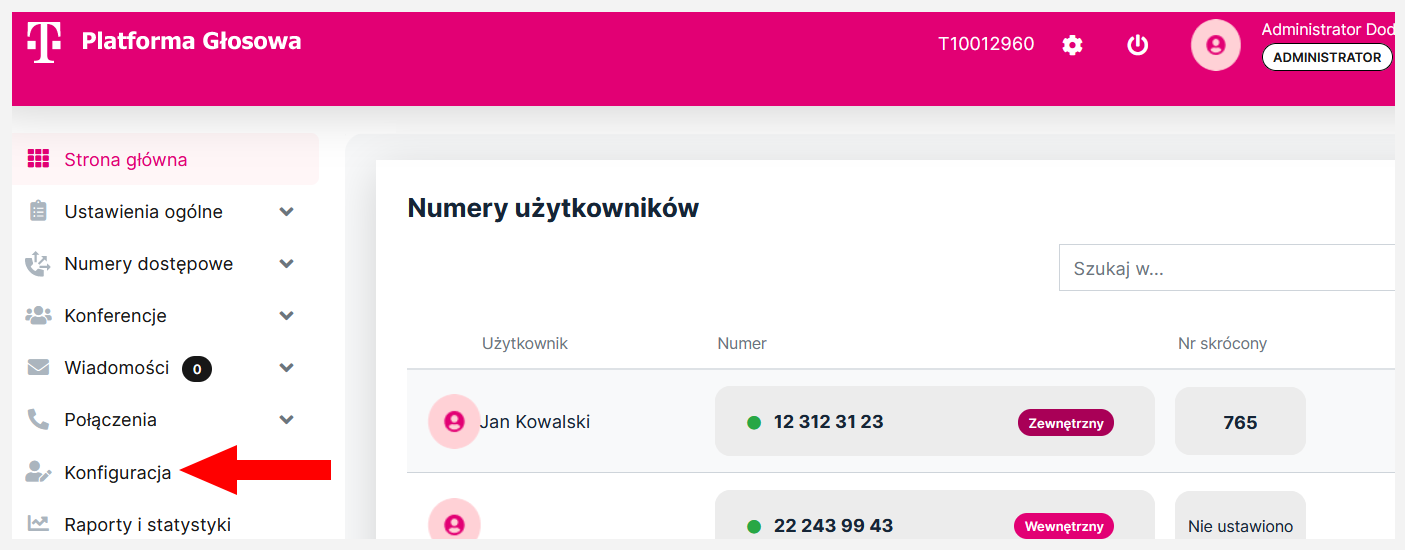
<span style="mso-bidi-font-size: 11.5pt; mso-bidi-font-family: 'TeleNeo Office'; mso-bidi-theme-font: minor-latin; mso-ansi-language: PL;"><span style="color: rgb(226, 0, 116);">**1.** </span>Z menu po lewej stronie wybierz **Konfiguracja.**</span>

[![image.png](https://bookstack.uc.t-mobile.pl/uploads/images/gallery/2024-06/scaled-1680-/H4Aimage.png)](https://bookstack.uc.t-mobile.pl/uploads/images/gallery/2024-06/H4Aimage.png)

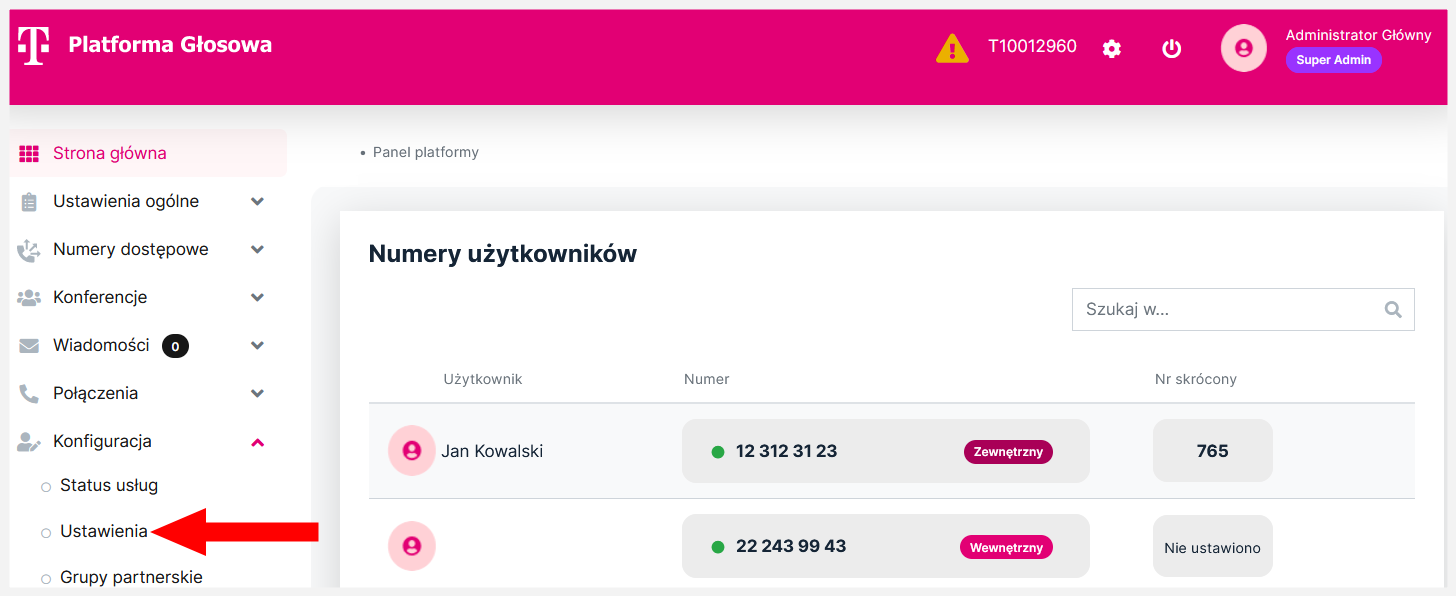
<span style="mso-bidi-font-size: 11.5pt; mso-bidi-font-family: 'TeleNeo Office'; mso-bidi-theme-font: minor-latin; mso-ansi-language: PL;"><span style="color: rgb(226, 0, 116);">**2.** <span style="color: rgb(0, 0, 0);">Następnie **Ustawienia.**</span></span></span>

[![image.png](https://bookstack.uc.t-mobile.pl/uploads/images/gallery/2024-06/scaled-1680-/VUkimage.png)](https://bookstack.uc.t-mobile.pl/uploads/images/gallery/2024-06/VUkimage.png)

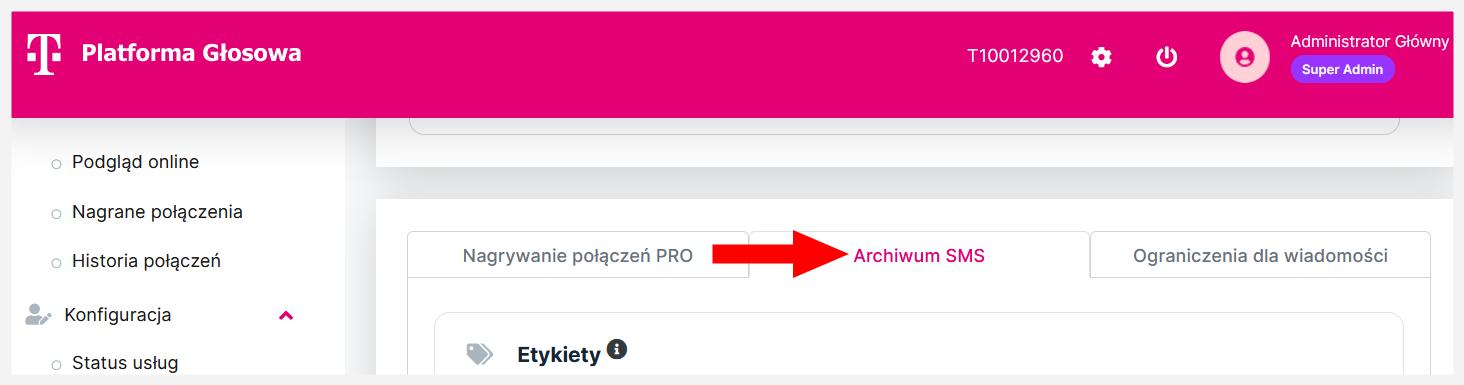
<span style="mso-bidi-font-size: 11.5pt; mso-bidi-font-family: 'TeleNeo Office'; mso-bidi-theme-font: minor-latin; mso-ansi-language: PL;"><span style="color: rgb(226, 0, 116);">**3.** <span style="color: rgb(0, 0, 0);">Przewiń stronę na sam dół i wybierz **Archiwum SMS.**</span></span></span>

[![image.png](https://bookstack.uc.t-mobile.pl/uploads/images/gallery/2024-06/scaled-1680-/0qRimage.png)](https://bookstack.uc.t-mobile.pl/uploads/images/gallery/2024-06/0qRimage.png)

### **Dodaj etykietę**

<p class="callout warning">**<span style="color: rgb(186, 55, 42);">Raz dodaną etykietę można edytować, ale nie można jej usunąć.</span>**</p>

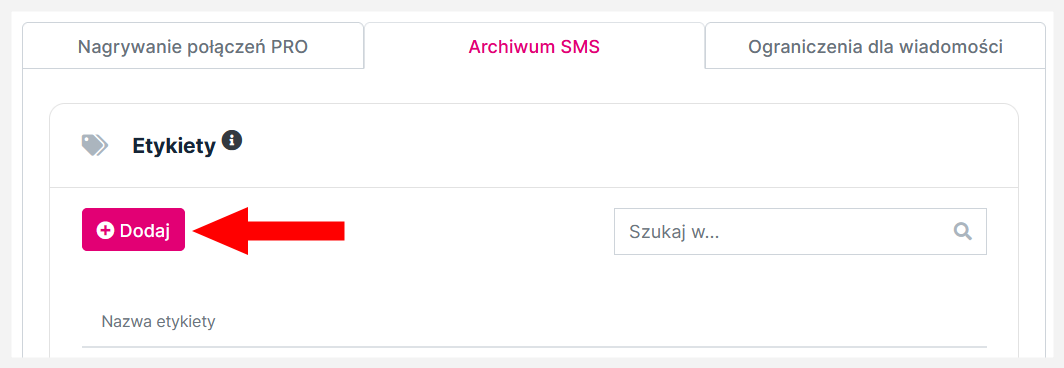
**<span style="mso-bidi-font-size: 11.5pt; mso-bidi-font-family: 'TeleNeo Office'; mso-bidi-theme-font: minor-latin; mso-ansi-language: PL;"><span style="color: rgb(226, 0, 116);">1.</span></span>**<span style="mso-bidi-font-size: 11.5pt; mso-bidi-font-family: 'TeleNeo Office'; mso-bidi-theme-font: minor-latin; mso-ansi-language: PL;"><span style="color: rgb(226, 0, 116);"> </span><span style="color: rgb(226, 0, 116);"><span style="color: #000000;">Naciś</span></span><span style="color: rgb(226, 0, 116);"><span style="color: #000000;">nij </span></span></span>**<span style="mso-bidi-font-size: 11.5pt; mso-bidi-font-family: 'TeleNeo Office'; mso-bidi-theme-font: minor-latin; mso-ansi-language: PL;"><span style="color: rgb(226, 0, 116);"><span style="color: #000000;">Dodaj</span></span></span>**

[![image.png](https://bookstack.uc.t-mobile.pl/uploads/images/gallery/2024-06/scaled-1680-/krpimage.png)](https://bookstack.uc.t-mobile.pl/uploads/images/gallery/2024-06/krpimage.png)

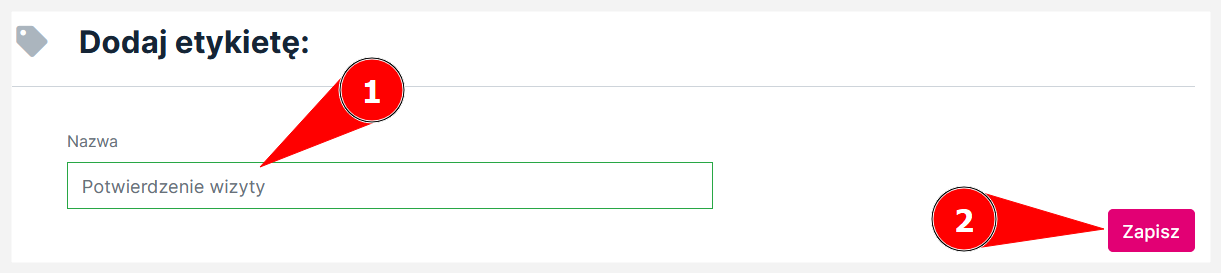
**<span style="mso-bidi-font-size: 11.5pt; mso-bidi-font-family: 'TeleNeo Office'; mso-bidi-theme-font: minor-latin; mso-ansi-language: PL;"><span style="color: rgb(226, 0, 116);">2.</span></span>**<span style="mso-bidi-font-size: 11.5pt; mso-bidi-font-family: 'TeleNeo Office'; mso-bidi-theme-font: minor-latin; mso-ansi-language: PL;"><span style="color: rgb(226, 0, 116);"> </span><span style="color: rgb(226, 0, 116);"><span style="color: #000000;">Wprowadź **Nazwę** etykiety.  
**<span style="color: rgb(226, 0, 116);">3.</span> Zapisz** nową etykietę.  
</span></span></span>

[![image.png](https://bookstack.uc.t-mobile.pl/uploads/images/gallery/2024-06/scaled-1680-/5Enimage.png)](https://bookstack.uc.t-mobile.pl/uploads/images/gallery/2024-06/5Enimage.png)

### **Edytuj etykietę**

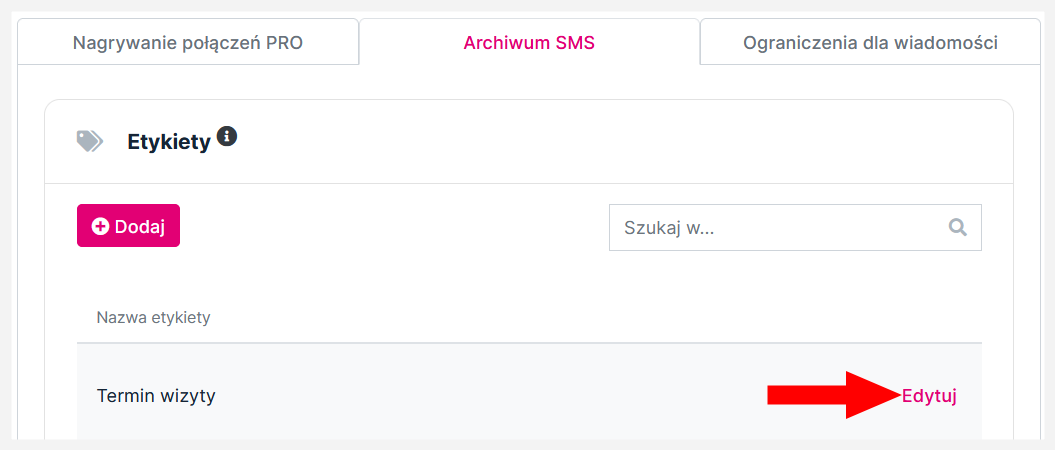
**<span style="mso-bidi-font-size: 11.5pt; mso-bidi-font-family: 'TeleNeo Office'; mso-bidi-theme-font: minor-latin; mso-ansi-language: PL;"><span style="color: rgb(226, 0, 116);">1.</span></span>**<span style="mso-bidi-font-size: 11.5pt; mso-bidi-font-family: 'TeleNeo Office'; mso-bidi-theme-font: minor-latin; mso-ansi-language: PL;"><span style="color: rgb(226, 0, 116);"> <span style="color: rgb(52, 73, 94);">Obok wybranej etykiety, </span></span><span style="color: rgb(52, 73, 94);">naciśnij </span></span><span style="color: rgb(52, 73, 94);">**<span style="mso-bidi-font-size: 11.5pt; mso-bidi-font-family: 'TeleNeo Office'; mso-bidi-theme-font: minor-latin; mso-ansi-language: PL;">Edytuj.</span>**</span>

[![image.png](https://bookstack.uc.t-mobile.pl/uploads/images/gallery/2024-06/scaled-1680-/QSJimage.png)](https://bookstack.uc.t-mobile.pl/uploads/images/gallery/2024-06/QSJimage.png)

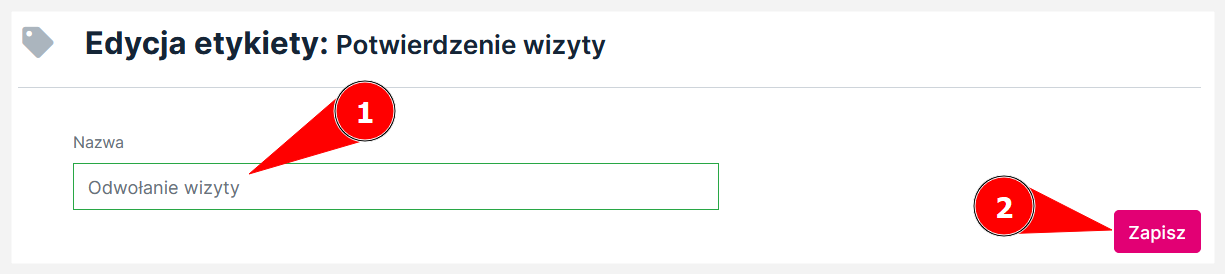
**<span style="mso-bidi-font-size: 11.5pt; mso-bidi-font-family: 'TeleNeo Office'; mso-bidi-theme-font: minor-latin; mso-ansi-language: PL;"><span style="color: rgb(226, 0, 116);">2.</span></span>**<span style="mso-bidi-font-size: 11.5pt; mso-bidi-font-family: 'TeleNeo Office'; mso-bidi-theme-font: minor-latin; mso-ansi-language: PL;"><span style="color: rgb(226, 0, 116);"> </span><span style="color: rgb(226, 0, 116);"><span style="color: #000000;">Zmień **Nazwę** etykiety.  
**<span style="color: rgb(226, 0, 116);">3.</span> Zapisz** edycję etykiety.  
</span></span></span>

[![image.png](https://bookstack.uc.t-mobile.pl/uploads/images/gallery/2024-06/scaled-1680-/TGwimage.png)](https://bookstack.uc.t-mobile.pl/uploads/images/gallery/2024-06/TGwimage.png)