# Assigning Phone Numbers to User Accounts

<video controls="controls" height="402" style="width: 804px; height: 402px;" width="804"> <source src="https://wpm.uc.t-mobile.pl/attachments/Konfiguracja_uzytkownikow.mp4" type="video/mp4"></source></video>

The final step in configuring Numer w Teams service is connecting users to the phone numbers provided by **T-Mobile**. Assigning numbers to a specific user or multiple users is done using commands executed in PowerShell.

#### **Single User Configuration**

<span class="ui-provider a b c d e f g h i j k l m n o p q r s t u v w x y z ab ac ae af ag ah ai aj ak" dir="ltr">Run the following command, changing <span style="color: rgb(226, 0, 116); background-color: rgb(241, 196, 15);">**uzytkownik@domenafirmowa.pl**</span> to the username of the user who should be assigned the phone number provided by **T-Mobile,** which you should insert in place of <span style="background-color: rgb(241, 196, 15); color: rgb(226, 0, 116);">**+48000000000**</span>.</span>

<p class="callout info">**<span style="color: rgb(226, 68, 116);"><span class="TextRun SCXW104419952 BCX8" data-contrast="none" lang="EN-GB" xml:lang="EN-GB"><span class="NormalTextRun SCXW104419952 BCX8">Set-</span><span class="NormalTextRun SpellingErrorV2Themed SCXW104419952 BCX8">CsPhoneNumberAssignment</span> <span class="NormalTextRun SCXW104419952 BCX8">-Identity</span> </span><span class="TextRun SCXW104419952 BCX8" data-contrast="none" lang="EN-GB" xml:lang="EN-GB"><span style="background-color: rgb(241, 196, 15);"><a class="Hyperlink SCXW104419952 BCX8" rel="noreferrer noopener" style="color: rgb(226, 68, 116); background-color: rgb(241, 196, 15);" target="_blank">uzytkownik@domenafirmowa.pl</a> </span></span></span><span style="color: rgb(226, 0, 116);"><span class="NormalTextRun SCXW104419952 BCX8">-</span><span class="NormalTextRun SpellingErrorV2Themed SCXW104419952 BCX8">PhoneNumber</span> <span class="TextRun Highlight SCXW104419952 BCX8" data-contrast="auto" lang="PL-PL" style="background-color: rgb(241, 196, 15);" xml:lang="PL-PL"><span class="NormalTextRun SCXW104419952 BCX8">+48</span><span class="NormalTextRun SCXW104419952 BCX8">000</span><span class="NormalTextRun SCXW104419952 BCX8">000000</span></span> <span class="TextRun SCXW104419952 BCX8" data-contrast="none" lang="EN-GB" xml:lang="EN-GB"><span class="NormalTextRun SCXW104419952 BCX8">-</span><span class="NormalTextRun SpellingErrorV2Themed SCXW104419952 BCX8">PhoneNumberType</span> <span class="NormalTextRun SpellingErrorV2Themed SCXW104419952 BCX8">DirectRouting</span></span></span>**</p>

#### **<span class="ui-provider a b c d e f g h i j k l m n o p q r s t u v w x y z ab ac ae af ag ah ai aj ak" dir="ltr">Multiple Users Configuration</span>**

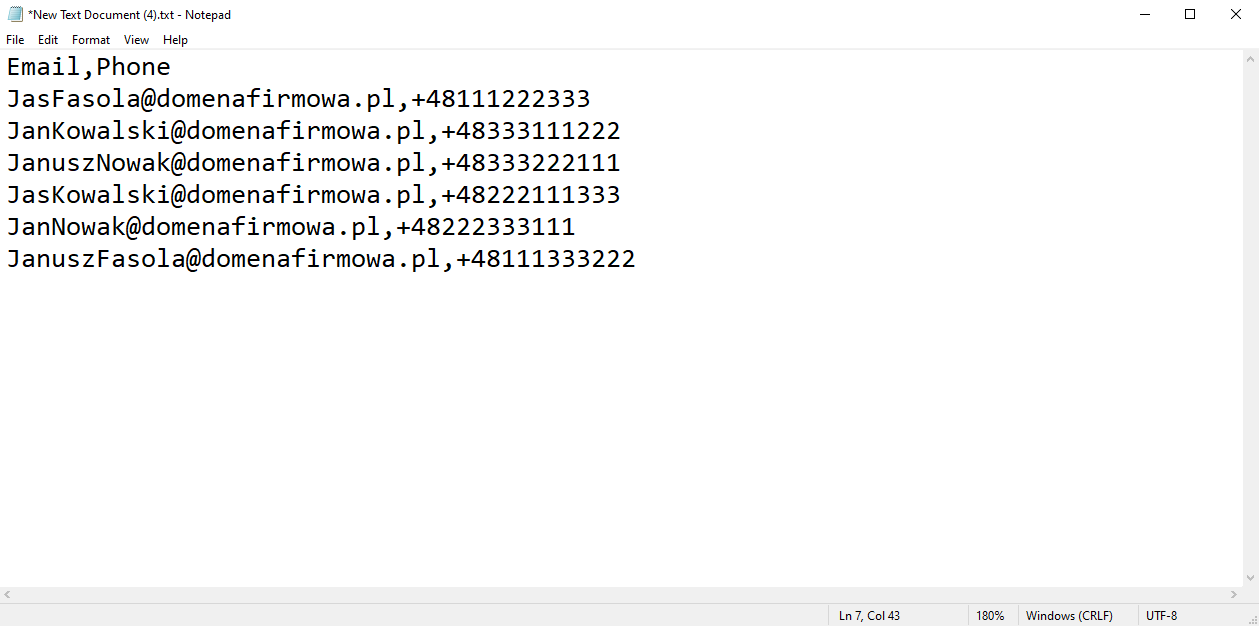
<span style="color: rgb(0, 0, 0);"><span class="TextRun SCXW104419952 BCX8" data-contrast="none" lang="PL-PL" xml:lang="PL-PL"><span class="NormalTextRun SCXW104419952 BCX8" data-ccp-parastyle="heading 2">To configure multiple users at once , prepare a **CSV** file (comma-separated value text file) containing the **user names** and **phone numbers** you want to assign to them. The file should be created according to the format below.</span></span></span>

<p class="callout info">**<span style="color: rgb(226, 68, 116);"><span class="TextRun SCXW104419952 BCX8" data-contrast="none" lang="PL-PL" xml:lang="PL-PL"><span class="NormalTextRun SpellingErrorV2Themed SCXW104419952 BCX8">Email,</span><span class="NormalTextRun SpellingErrorV2Themed SCXW104419952 BCX8">Phone</span></span>   
<span class="TextRun SCXW104419952 BCX8" data-contrast="none" lang="PL-PL" xml:lang="PL-PL"><span class="NormalTextRun ContextualSpellingAndGrammarErrorV2Themed SCXW104419952 BCX8">uzytkownika@domenafirmowa.pl,+</span><span class="NormalTextRun SCXW104419952 BCX8">48</span><span class="NormalTextRun SCXW104419952 BCX8">000</span><span class="NormalTextRun SCXW104419952 BCX8">000000</span></span>   
<span class="TextRun SCXW104419952 BCX8" data-contrast="none" lang="PL-PL" xml:lang="PL-PL"><span class="NormalTextRun ContextualSpellingAndGrammarErrorV2Themed SCXW104419952 BCX8">uzytkownika@domenafirmowa.pl</span><span class="NormalTextRun SCXW104419952 BCX8">,</span><span class="NormalTextRun ContextualSpellingAndGrammarErrorV2Themed SCXW104419952 BCX8">+</span><span class="NormalTextRun SCXW104419952 BCX8">48</span><span class="NormalTextRun SCXW104419952 BCX8">000000000</span></span>   
<span class="TextRun SCXW104419952 BCX8" data-contrast="none" lang="PL-PL" xml:lang="PL-PL"><span class="NormalTextRun ContextualSpellingAndGrammarErrorV2Themed SCXW104419952 BCX8">uzytkownika@domenafirmowa.pl,</span></span><span class="TextRun SCXW104419952 BCX8" data-contrast="none" lang="PL-PL" xml:lang="PL-PL"><span class="NormalTextRun ContextualSpellingAndGrammarErrorV2Themed SCXW104419952 BCX8">+</span><span class="NormalTextRun SCXW104419952 BCX8">48</span><span class="NormalTextRun SCXW104419952 BCX8">000000000</span></span></span>**</p>

<span style="color: rgb(0, 0, 0);"><span class="TextRun SCXW104419952 BCX8" data-contrast="none" lang="PL-PL" xml:lang="PL-PL"><span class="NormalTextRun SCXW104419952 BCX8" data-ccp-parastyle="heading 2"><span class="TextRun SCXW104419952 BCX8" data-contrast="auto" lang="PL-PL" xml:lang="PL-PL"><span class="NormalTextRun SCXW104419952 BCX8"><span class="ui-provider a b c d e f g h i j k l m n o p q r s t u v w x y z ab ac ae af ag ah ai aj ak" dir="ltr">Replace <span style="color: rgb(226, 0, 116);">**uzytkownik@domenafirmowa.pl**</span> with the actual usernames of the users you want to assign phone numbers to.</span> <span class="ui-provider a b c d e f g h i j k l m n o p q r s t u v w x y z ab ac ae af ag ah ai aj ak" dir="ltr">Replace <span style="color: rgb(226, 0, 116);">**+48000000000**</span> with the corresponding T-Mobile phone numbers.</span><span style="color: rgb(226, 0, 116);"> <span class="ui-provider a b c d e f g h i j k l m n o p q r s t u v w x y z ab ac ae af ag ah ai aj ak" dir="ltr" style="color: rgb(0, 0, 0);"><span class="ui-provider a b c d e f g h i j k l m n o p q r s t u v w x y z ab ac ae af ag ah ai aj ak" dir="ltr">Add more rows to the file following the same format for each additional user you want to configure.</span></span></span></span></span></span></span></span>

<span style="color: rgb(0, 0, 0);"><span class="TextRun SCXW104419952 BCX8" data-contrast="none" lang="PL-PL" xml:lang="PL-PL"><span class="NormalTextRun SCXW104419952 BCX8" data-ccp-parastyle="heading 2"><span class="TextRun SCXW104419952 BCX8" data-contrast="auto" lang="PL-PL" xml:lang="PL-PL"><span class="NormalTextRun SCXW104419952 BCX8"><span class="ui-provider a b c d e f g h i j k l m n o p q r s t u v w x y z ab ac ae af ag ah ai aj ak" dir="ltr">Finished file should look like this:</span></span></span></span></span></span>

[![obraz.png](https://bookstack.uc.t-mobile.pl/uploads/images/gallery/2023-12/scaled-1680-/1Z0obraz.png)](https://bookstack.uc.t-mobile.pl/uploads/images/gallery/2023-12/1Z0obraz.png)

<p class="callout warning"><span class="ui-provider a b c d e f g h i j k l m n o p q r s t u v w x y z ab ac ae af ag ah ai aj ak" dir="ltr">Before saving the file, make sure that the phone numbers have the correct format. The number should start with a "+" sign followed by 11 digits, starting with 48. An example number is: +48123456789.</span></p>

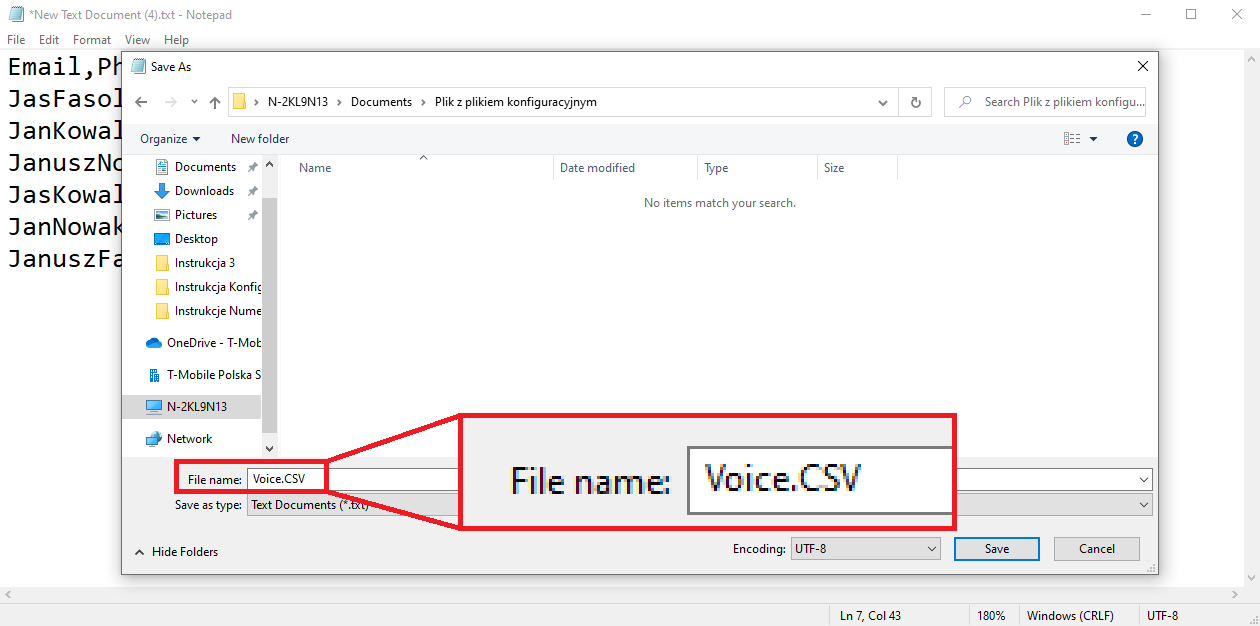
<span class="ui-provider a b c d e f g h i j k l m n o p q r s t u v w x y z ab ac ae af ag ah ai aj ak" dir="ltr">Save the file with the name **Voice.CSV (Voice** is the filename and **CSV** is the file extension).</span>

[![obraz.png](https://bookstack.uc.t-mobile.pl/uploads/images/gallery/2023-12/scaled-1680-/PiFobraz.png)](https://bookstack.uc.t-mobile.pl/uploads/images/gallery/2023-12/PiFobraz.png)

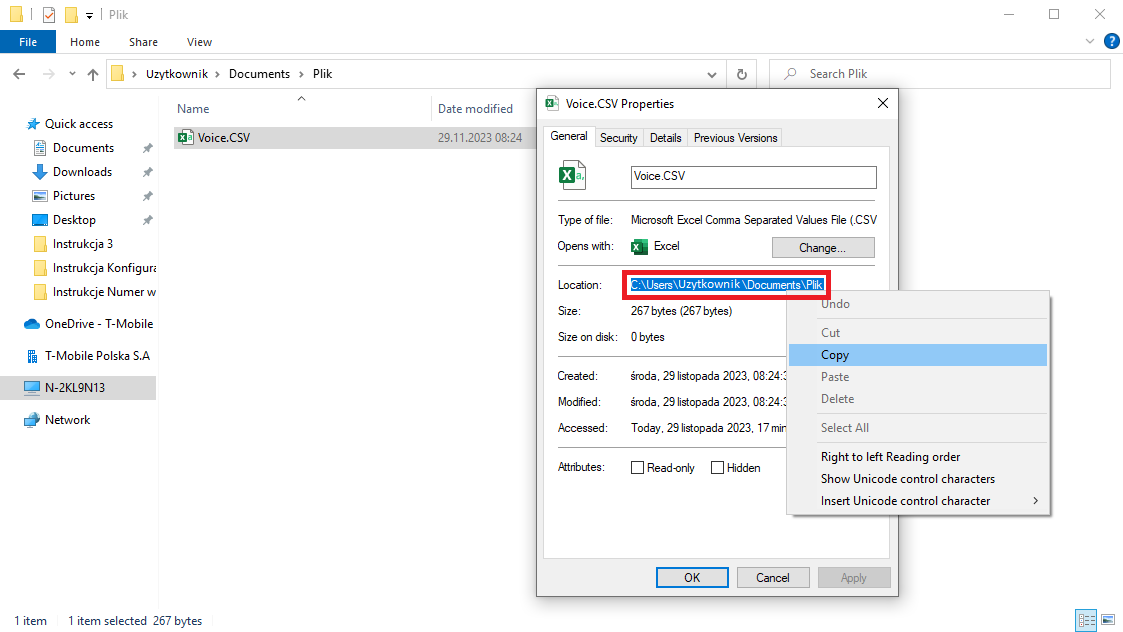
<span class="ui-provider a b c d e f g h i j k l m n o p q r s t u v w x y z ab ac ae af ag ah ai aj ak" dir="ltr">Next, open the file location, **right-click** on the file, select **Properties** and copy the file **location**.</span>

[![obraz.png](https://bookstack.uc.t-mobile.pl/uploads/images/gallery/2023-12/scaled-1680-/dZOobraz.png)](https://bookstack.uc.t-mobile.pl/uploads/images/gallery/2023-12/dZOobraz.png)

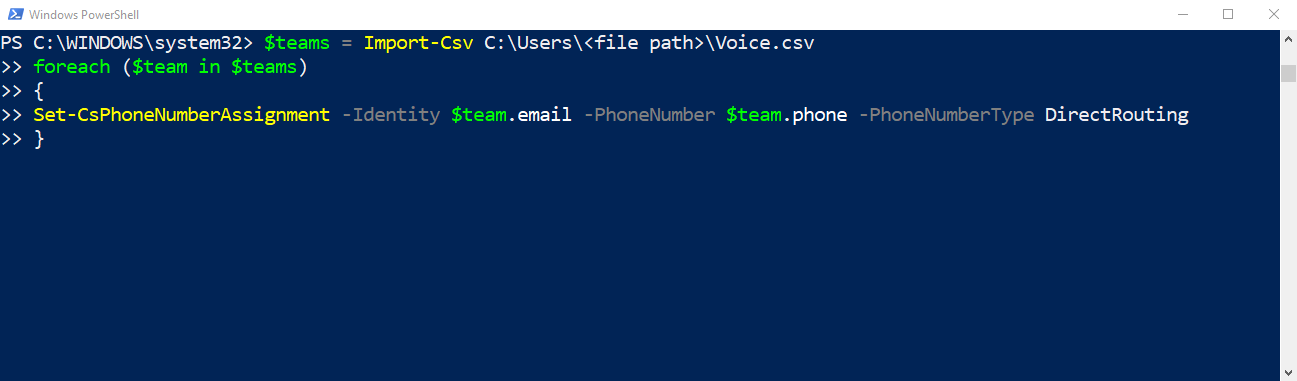
<span class="ui-provider a b c d e f g h i j k l m n o p q r s t u v w x y z ab ac ae af ag ah ai aj ak" dir="ltr">In the following command, replace <span style="color: rgb(226, 0, 116); background-color: rgb(241, 196, 15);">**C:\\Users\\&lt;file path&gt;**</span> with the value you copied earlier. Then, execute it in **PowerShell.**</span>

<p class="callout info">**<span style="color: rgb(226, 68, 116);"><span class="EOP SCXW104419952 BCX8" data-ccp-props="{"134245417":false,"335559685":3018}">$teams = Import-Csv <span style="background-color: rgb(241, 196, 15);">C:\\Users\\&lt;file path&gt;</span>\\Voice.csv  
foreach ($team in $teams)   
{   
Set-CsPhoneNumberAssignment -Identity $team.email -PhoneNumber $team.phone -PhoneNumberType DirectRouting  
} </span></span>**</p>

[![obraz.png](https://bookstack.uc.t-mobile.pl/uploads/images/gallery/2023-12/scaled-1680-/Zyvobraz.png)](https://bookstack.uc.t-mobile.pl/uploads/images/gallery/2023-12/Zyvobraz.png)

Once the configuration is complete, it is possible to make phone calls in the **MS Teams** application. To do this, log into the account of a user to whom you have assigned a phone number and who has a license with the **Teams Phone** add-on.