# How to Order Microsoft Teams Operator Connect from T-Mobile

The process for ordering the <span style="color: rgb(226, 0, 116);"><span style="color: rgb(0, 0, 0);"><span style="color: rgb(57, 57, 57);"><span style="color: rgb(226, 0, 116);"><span style="color: rgb(0, 0, 0);"><span style="color: rgb(57, 57, 57);">**Microsoft Teams** </span></span></span>**Operator Connect**</span></span></span> service is described below. You will learn where and how to submit a form to express your interest in purchasing the service and provide us with the required information, when our sales representative will contact you, and how the service will be activated once the order has been finalized.

If you do not have **Microsoft Teams** and **Microsoft Teams Phone Standard**, visit our <span style="color: rgb(226, 0, 116);">*[Microsoft 365 for Business - T-Mobile Business Poland ](https://biznes.t-mobile.pl/pl/produkty-i-uslugi/modern-workplace/microsoft-365)*<span style="color: rgb(54, 54, 54);">website or contact your account manager.</span></span>

To start the process, submit the form through the <span style="color: rgb(57, 57, 57);">**<span class="hpyHhmSe9hmk5gopLr9a5Q==">Microsoft Teams admin center.</span>**</span>

### **Teams admin center**

1. <span style="mso-ansi-language: PL;">Sign in with an administrator account to the </span><span style="color: rgb(57, 57, 57);">**<span class="hpyHhmSe9hmk5gopLr9a5Q==">Microsoft Teams admin center </span>**<span class="hpyHhmSe9hmk5gopLr9a5Q==">(</span></span><span style="mso-ansi-language: PL;">Teams admin center): <span style="color: rgb(226, 0, 116);">*[https://admin.teams.microsoft.com](https://admin.teams.microsoft.com/)*[<span style="color: rgb(0, 0, 0);">.</span>](https://admin.teams.microsoft.com/)</span></span><div class="M3pcB5evSAtYMozck1WU7A==" id="bkmrk--2"></div>
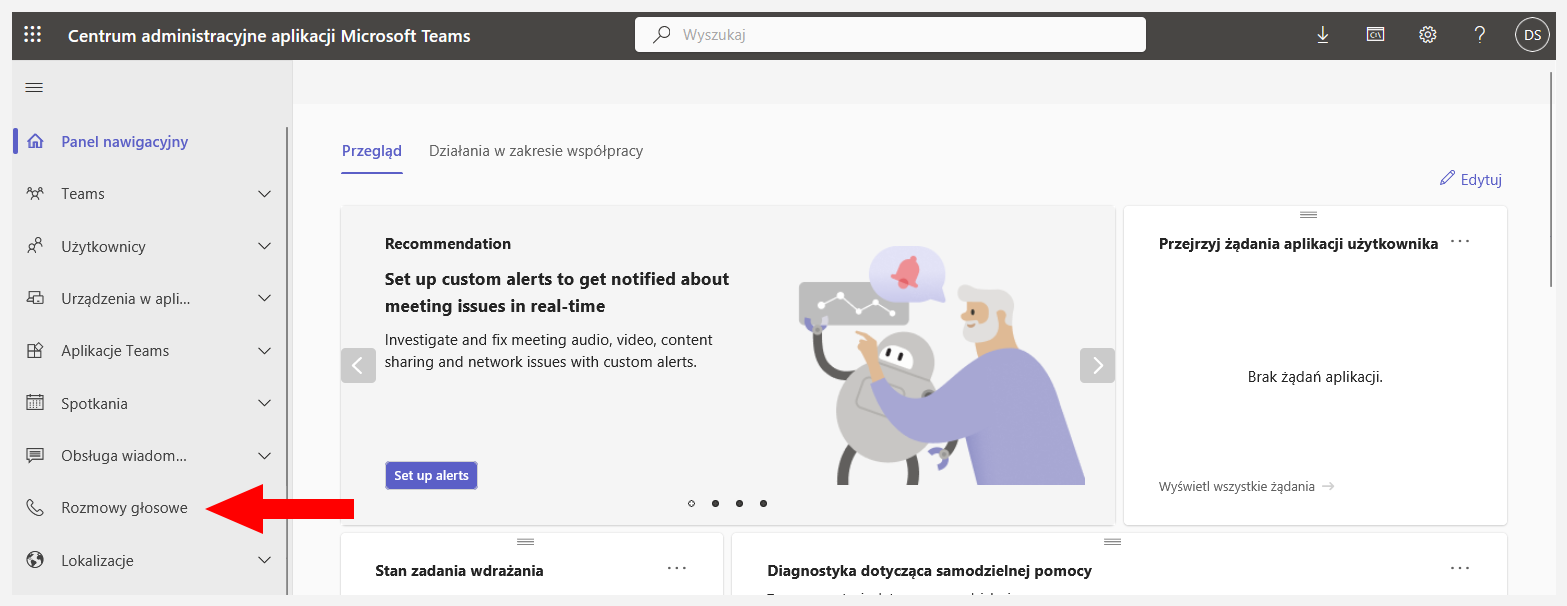
2. <span style="mso-ansi-language: PL;"><span style="color: rgb(226, 0, 116);"><span style="color: rgb(0, 0, 0);">In the left-hand menu, go to **Voice**.</span></span></span><span style="mso-ansi-language: PL;"><span style="color: rgb(226, 0, 116);"><span style="color: rgb(0, 0, 0);">[![SOy14246953-t-business-mailing-dla-uslugi-numer-w-teams-aktualizacja3.png](https://bookstack.uc.t-mobile.pl/uploads/images/gallery/2024-07/scaled-1680-/soy14246953-t-business-mailing-dla-uslugi-numer-w-teams-aktualizacja3.png)](https://bookstack.uc.t-mobile.pl/uploads/images/gallery/2024-07/soy14246953-t-business-mailing-dla-uslugi-numer-w-teams-aktualizacja3.png)</span></span></span>
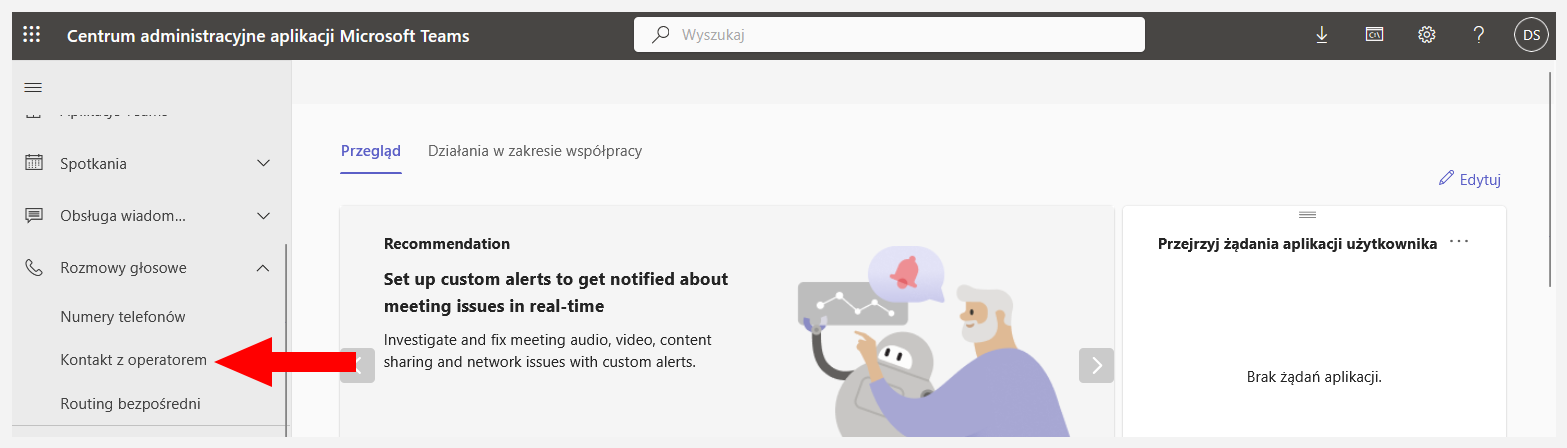
3. <span style="mso-ansi-language: PL;"><span style="color: rgb(226, 0, 116);"><span style="color: rgb(0, 0, 0);">Then select **Operator Connect**.</span></span></span>[![Micimage.png](https://bookstack.uc.t-mobile.pl/uploads/images/gallery/2024-07/scaled-1680-/owzmicimage.png)](https://bookstack.uc.t-mobile.pl/uploads/images/gallery/2024-07/owzmicimage.png)
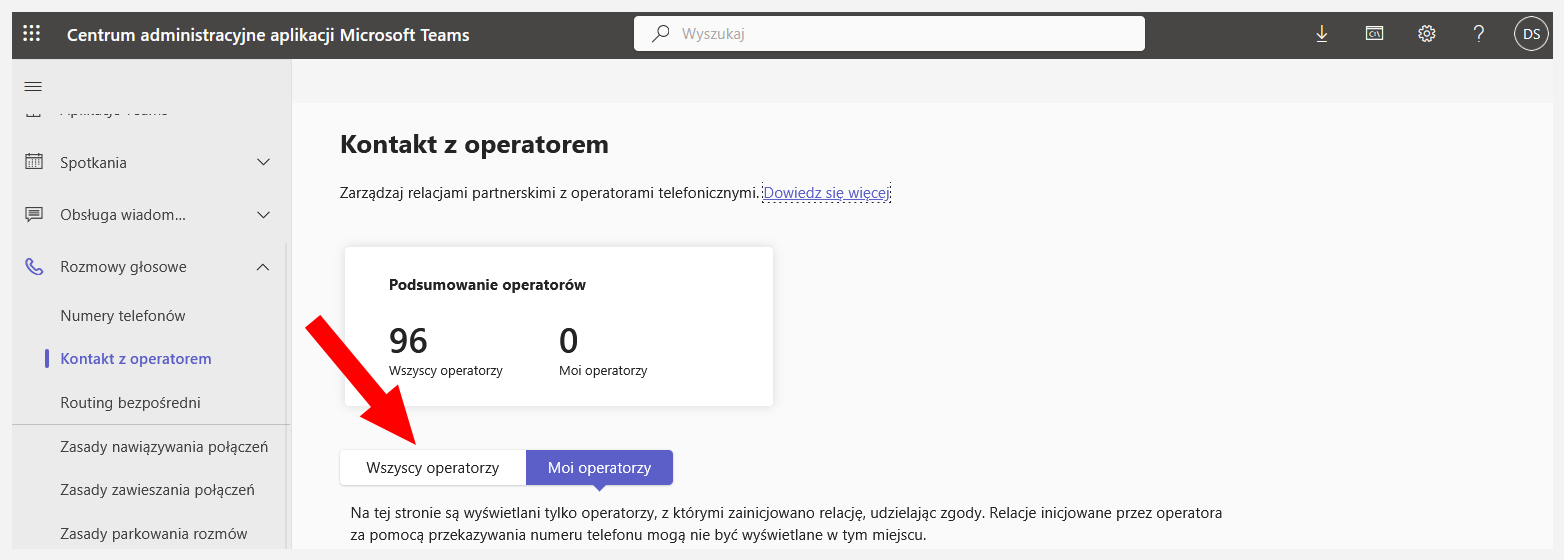
4. <span style="mso-ansi-language: PL;"><span style="color: rgb(226, 0, 116);"><span style="color: rgb(0, 0, 0);">Select the **All operators** tab.</span></span></span>[![VZElcLimage.png](https://bookstack.uc.t-mobile.pl/uploads/images/gallery/2024-07/scaled-1680-/74mvzelclimage.png)](https://bookstack.uc.t-mobile.pl/uploads/images/gallery/2024-07/74mvzelclimage.png)
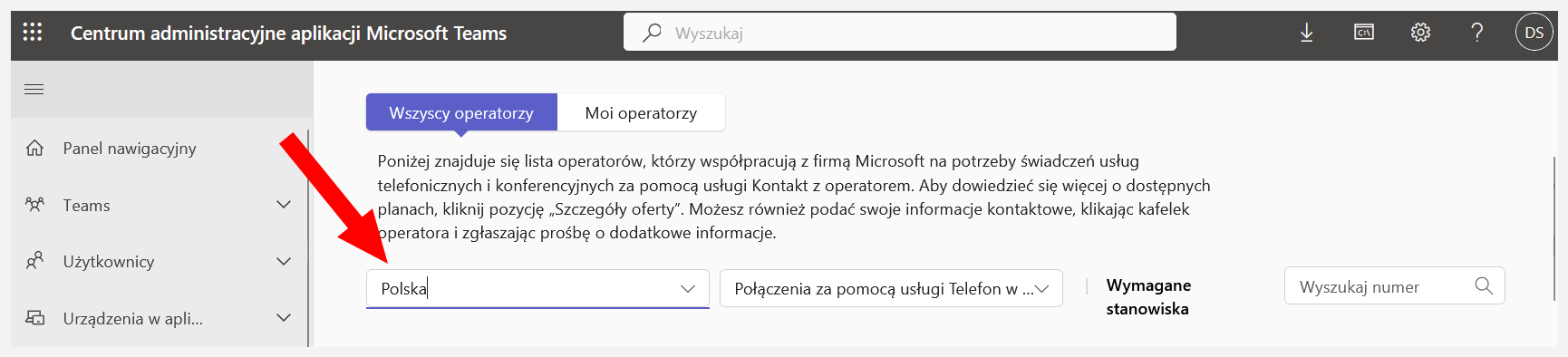
5. <span style="mso-ansi-language: PL;">Display the operators available in </span>**<span style="mso-ansi-language: PL;">Poland.</span>**[![jgTimage.png](https://bookstack.uc.t-mobile.pl/uploads/images/gallery/2024-07/scaled-1680-/XCQjgtimage.png)](https://bookstack.uc.t-mobile.pl/uploads/images/gallery/2024-07/XCQjgtimage.png)
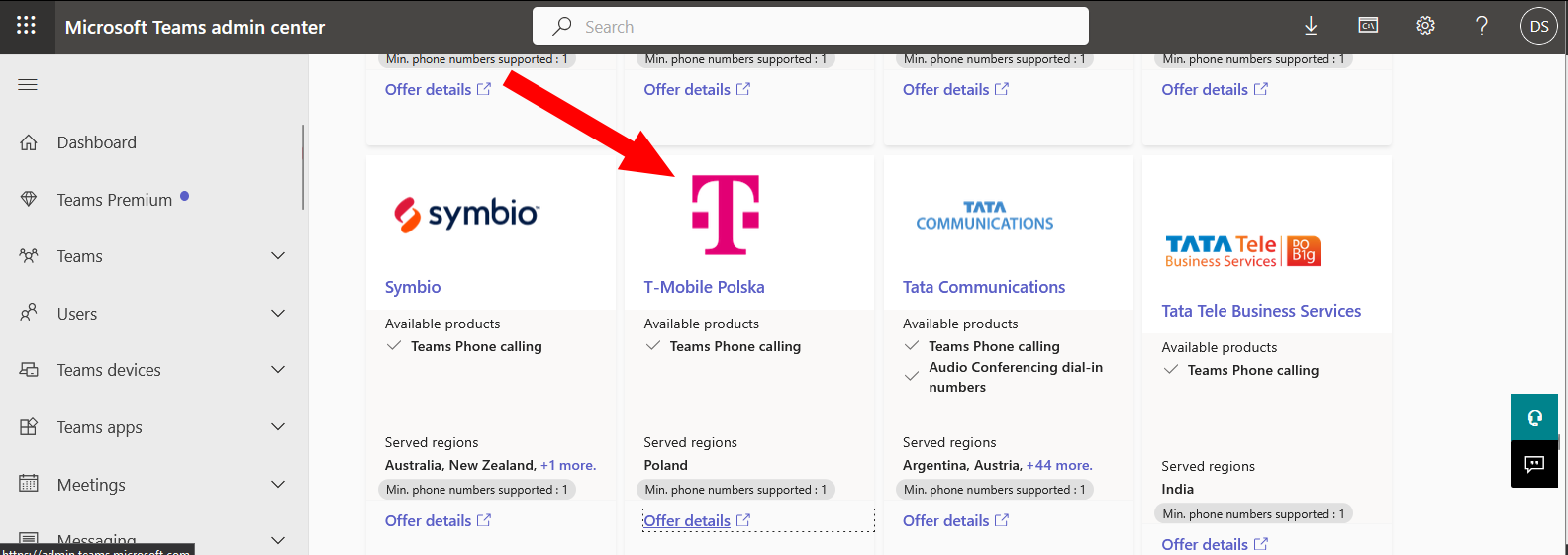
6. <span style="mso-ansi-language: PL;"><span style="color: rgb(226, 0, 116);"><span style="color: rgb(0, 0, 0);">Find **T-Mobile Polska** in the list of operators and select it.</span></span></span>[![obraz.png](https://bookstack.uc.t-mobile.pl/uploads/images/gallery/2025-08/scaled-1680-/0uIobraz.png)](https://bookstack.uc.t-mobile.pl/uploads/images/gallery/2025-08/0uIobraz.png)
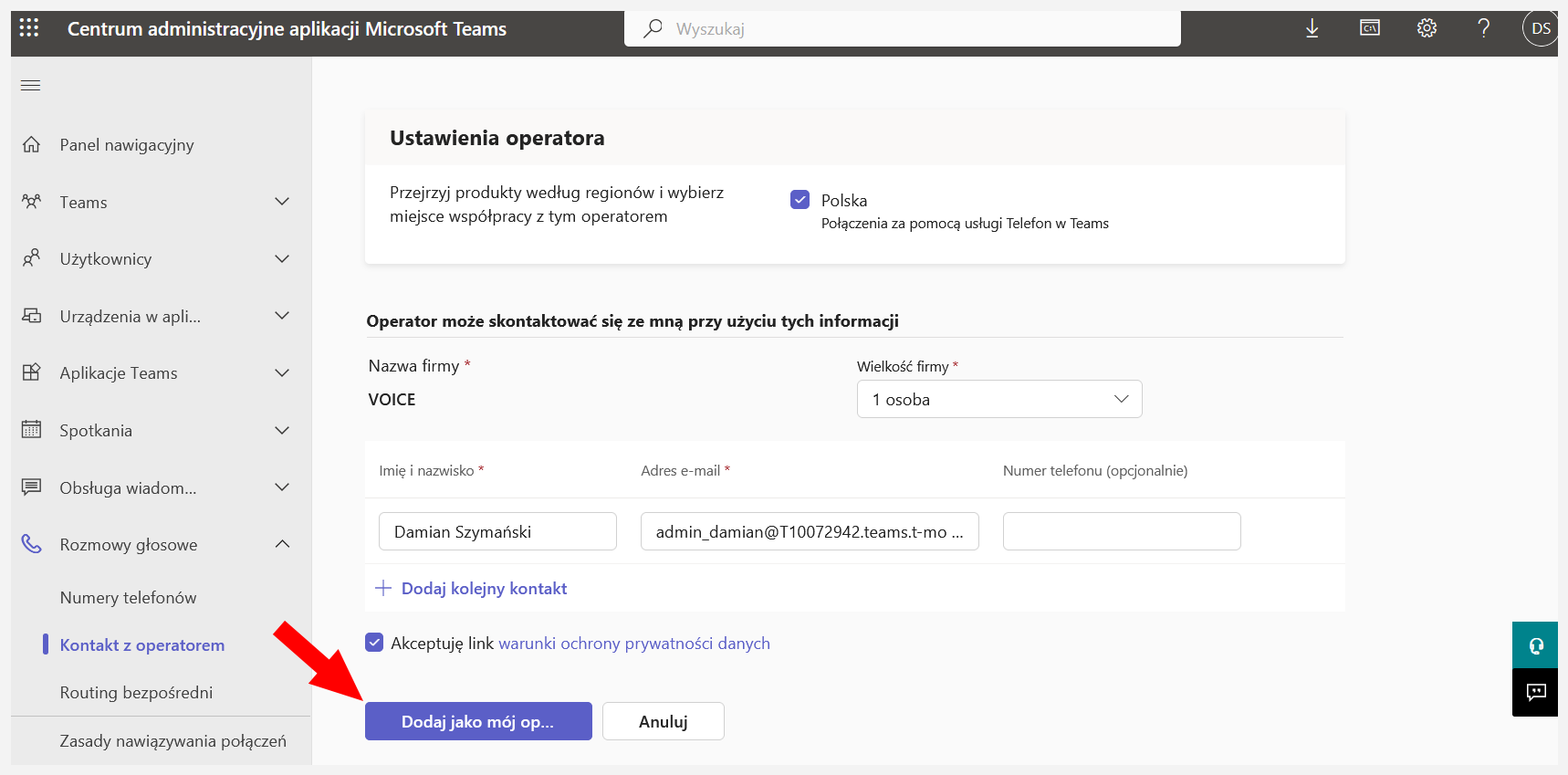
7. <span style="mso-ansi-language: PL;">Complete the information on the page:</span>
    - <span style="mso-ansi-language: PL;"><span style="color: rgb(57, 57, 57);"><span class="hpyHhmSe9hmk5gopLr9a5Q==">select the country where the service will be provided,</span></span></span>
    - <span style="mso-ansi-language: PL;"><span style="color: rgb(57, 57, 57);"><span class="hpyHhmSe9hmk5gopLr9a5Q==">select your organization size,</span></span></span>
    - <span style="mso-ansi-language: PL;"><span style="color: rgb(57, 57, 57);"><span class="hpyHhmSe9hmk5gopLr9a5Q==">complete the contact form,</span></span></span>
    - <span style="mso-ansi-language: PL;"><span style="color: rgb(57, 57, 57);"><span class="hpyHhmSe9hmk5gopLr9a5Q==">accept the privacy settings.</span></span></span>
8. <span style="mso-ansi-language: PL;"><span style="color: rgb(226, 0, 116);"><span style="color: rgb(0, 0, 0);"><span style="color: rgb(226, 0, 116);"><span style="color: rgb(0, 0, 0);">Then submit the form by selecting **Add as my operator**.</span></span></span></span></span>[![pNYimage.png](https://bookstack.uc.t-mobile.pl/uploads/images/gallery/2024-07/scaled-1680-/607pnyimage.png)](https://bookstack.uc.t-mobile.pl/uploads/images/gallery/2024-07/607pnyimage.png)<span style="mso-ansi-language: PL;"><span style="color: rgb(226, 0, 116);"><span style="color: rgb(0, 0, 0);"><span style="color: rgb(226, 0, 116);"><span style="color: rgb(0, 0, 0);">After the form has been submitted, you will receive a confirmation email acknowledging receipt of your request. Then wait for **T-Mobile** to contact you. </span></span></span></span></span>

### **Contact with T-Mobile**

After the contact form has been submitted through the <span style="color: rgb(57, 57, 57);">**<span class="hpyHhmSe9hmk5gopLr9a5Q==">Microsoft Teams admin center, </span>**<span class="hpyHhmSe9hmk5gopLr9a5Q==">our sales representative will contact the person specified in the form. You will then receive our offer, after which the details of the agreement and service configuration will be determined. The key elements of this process will include:</span></span>

- <span style="color: rgb(57, 57, 57);"><span class="hpyHhmSe9hmk5gopLr9a5Q=="><span style="mso-ansi-language: PL;">Assigning phone numbers from the T-Mobile number pool or porting them from another service or operator.</span></span></span>
- <span style="color: rgb(57, 57, 57);"><span class="hpyHhmSe9hmk5gopLr9a5Q=="><span style="mso-ansi-language: PL;">Selecting a tariff for phone calls.</span></span></span>
- <span style="color: rgb(57, 57, 57);"><span class="hpyHhmSe9hmk5gopLr9a5Q=="><span style="mso-ansi-language: PL;">Determining the service activation date, which depends on the number of phone numbers and whether they are being ported from another operator.</span></span></span>

### **Service configuration**

The service is activated automatically. The customer only needs to assign phone numbers to user accounts in **Microsoft Teams**. This process is completed in the <span style="color: rgb(57, 57, 57);">**<span class="hpyHhmSe9hmk5gopLr9a5Q==">Microsoft Teams admin center </span>**<span class="hpyHhmSe9hmk5gopLr9a5Q==">(</span></span><span style="mso-ansi-language: PL;">Teams admin center)</span> and is described in the following guide: <span style="color: rgb(226, 0, 116);">*[Assigning phone numbers to Microsoft Teams user accounts](https://info.biznes.t-mobile.pl/books/numer-w-teams/page/przypisanie-numerow-telefonicznych-do-kont-uzytkownikow-microsoft-teams)*<span style="color: rgb(0, 0, 0);">. </span></span>