# Creating a user for integration with the telephony network

<span class="TextRun SCXW150732740 BCX8" data-contrast="auto" lang="PL-PL" xml:lang="PL-PL"><span class="NormalTextRun SCXW150732740 BCX8" data-ccp-parastyle="Body Text"><video controls="controls" height="403" style="width: 806px; height: 403px;" width="806"> <source src="https://d-wpm.uc.t-mobile.pl/attachments/Tworzenie_uzytkownika.mp4" type="video/mp4"></source></video></span></span>

<span class="ui-provider a b c d e f g h i j k l m n o p q r s t u v w x y z ab ac ae af ag ah ai aj ak" dir="ltr">To integrate a tenant with the T-Mobile network, you need to create a user and assign them a license with the Teams Phone add-on. After the integration work is complete, this user can be deleted. This will allow you to recover the license.</span>

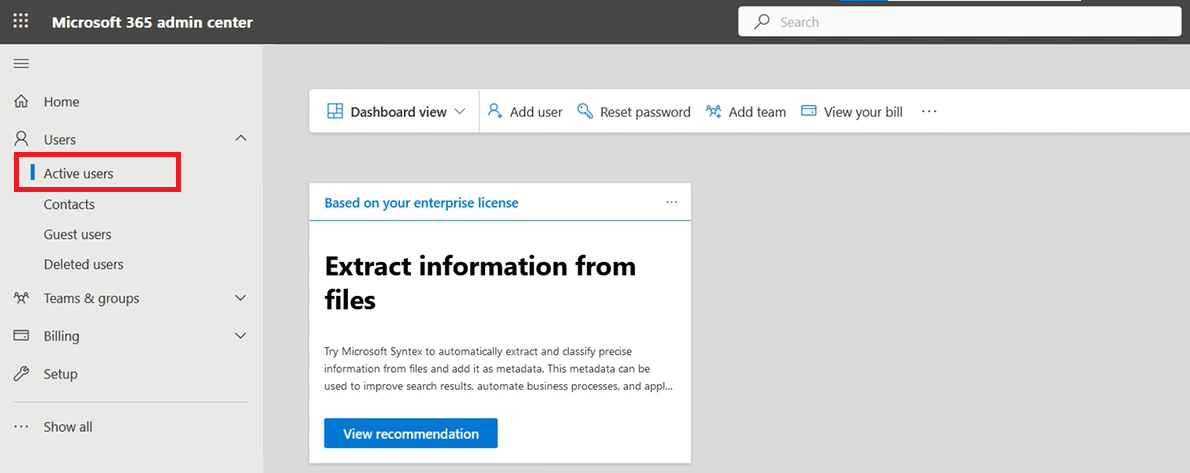
<span style="color: rgb(226, 0, 116);">**<span class="EOP SCXW150732740 BCX8" data-ccp-props="{"134245417":false,"201341983":0,"335551550":6,"335551620":6,"335559685":2040,"335559737":2,"335559738":282,"335559740":252}">1.</span>** <span class="EOP SCXW150732740 BCX8" data-ccp-props="{"134245417":false,"201341983":0,"335551550":6,"335551620":6,"335559685":2040,"335559737":2,"335559738":282,"335559740":252}"><span style="color: rgb(0, 0, 0);"><span class="ui-provider a b c d e f g h i j k l m n o p q r s t u v w x y z ab ac ae af ag ah ai aj ak" dir="ltr">From the menu on the left, select **Users** &gt; **Active Users**.</span></span></span></span>

[![obraz.png](https://bookstack.uc.t-mobile.pl/uploads/images/gallery/2023-11/scaled-1680-/Hi6obraz.png)](https://bookstack.uc.t-mobile.pl/uploads/images/gallery/2023-11/Hi6obraz.png)

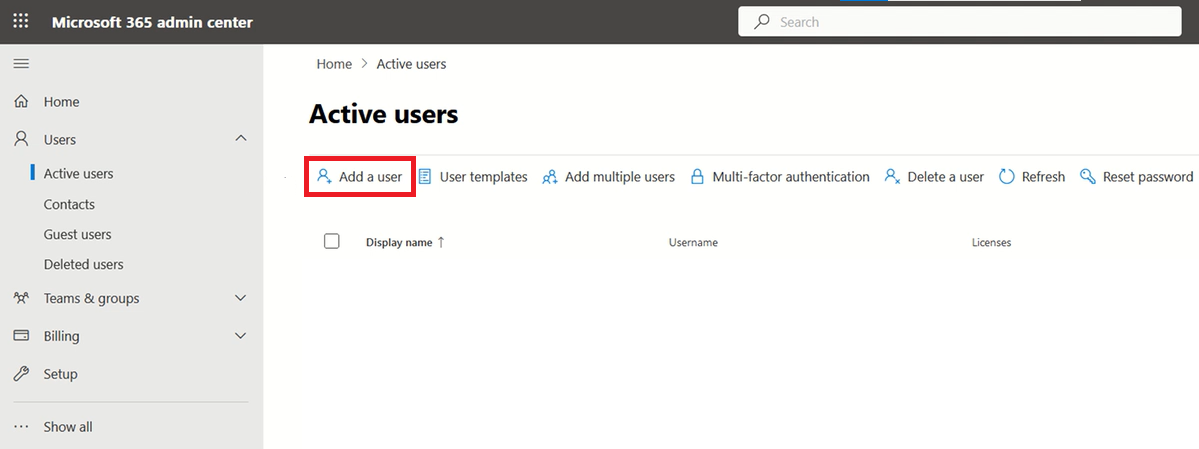
<span style="color: rgb(226, 0, 116);">**2.** <span style="color: rgb(0, 0, 0);"><span class="ui-provider a b c d e f g h i j k l m n o p q r s t u v w x y z ab ac ae af ag ah ai aj ak" dir="ltr">Select **Add a user**.</span></span></span>

[![obraz.png](https://bookstack.uc.t-mobile.pl/uploads/images/gallery/2023-11/scaled-1680-/oMyobraz.png)](https://bookstack.uc.t-mobile.pl/uploads/images/gallery/2023-11/oMyobraz.png)

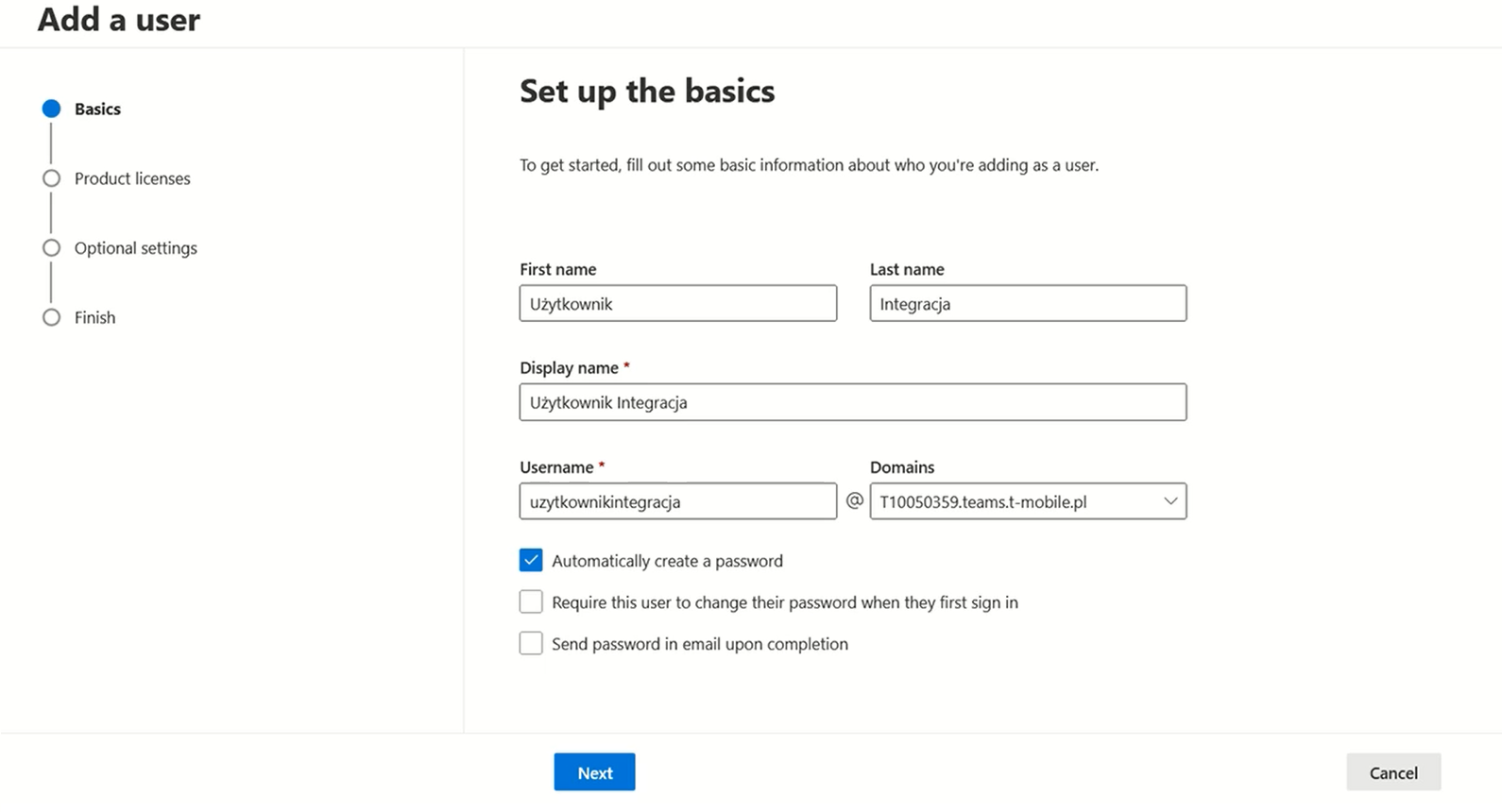
<span class="WACImageContainer NoPadding AttachedToBeginning DragDrop SCXW150732740 BCX8" role="presentation"><span style="color: rgb(226, 68, 116);">**3.** </span></span><span class="TextRun SCXW150732740 BCX8" data-contrast="auto" lang="PL-PL" xml:lang="PL-PL"><span class="NormalTextRun SCXW150732740 BCX8"><span class="ui-provider a b c d e f g h i j k l m n o p q r s t u v w x y z ab ac ae af ag ah ai aj ak" dir="ltr">Fill in the user's information and select the password settings. Enter the domain that was assigned to your company by T-Mobile, for example: **T10012345.teams.t-mobile.pl**.</span></span></span><span class="EOP SCXW150732740 BCX8" data-ccp-props="{"134245417":false,"335559685":3018}"><span class="LineBreakBlob BlobObject DragDrop SCXW150732740 BCX8"><span class="SCXW150732740 BCX8">  
</span></span></span>

[![image.png](https://bookstack.uc.t-mobile.pl/uploads/images/gallery/2023-11/scaled-1680-/oywimage.png)](https://bookstack.uc.t-mobile.pl/uploads/images/gallery/2023-11/oywimage.png)

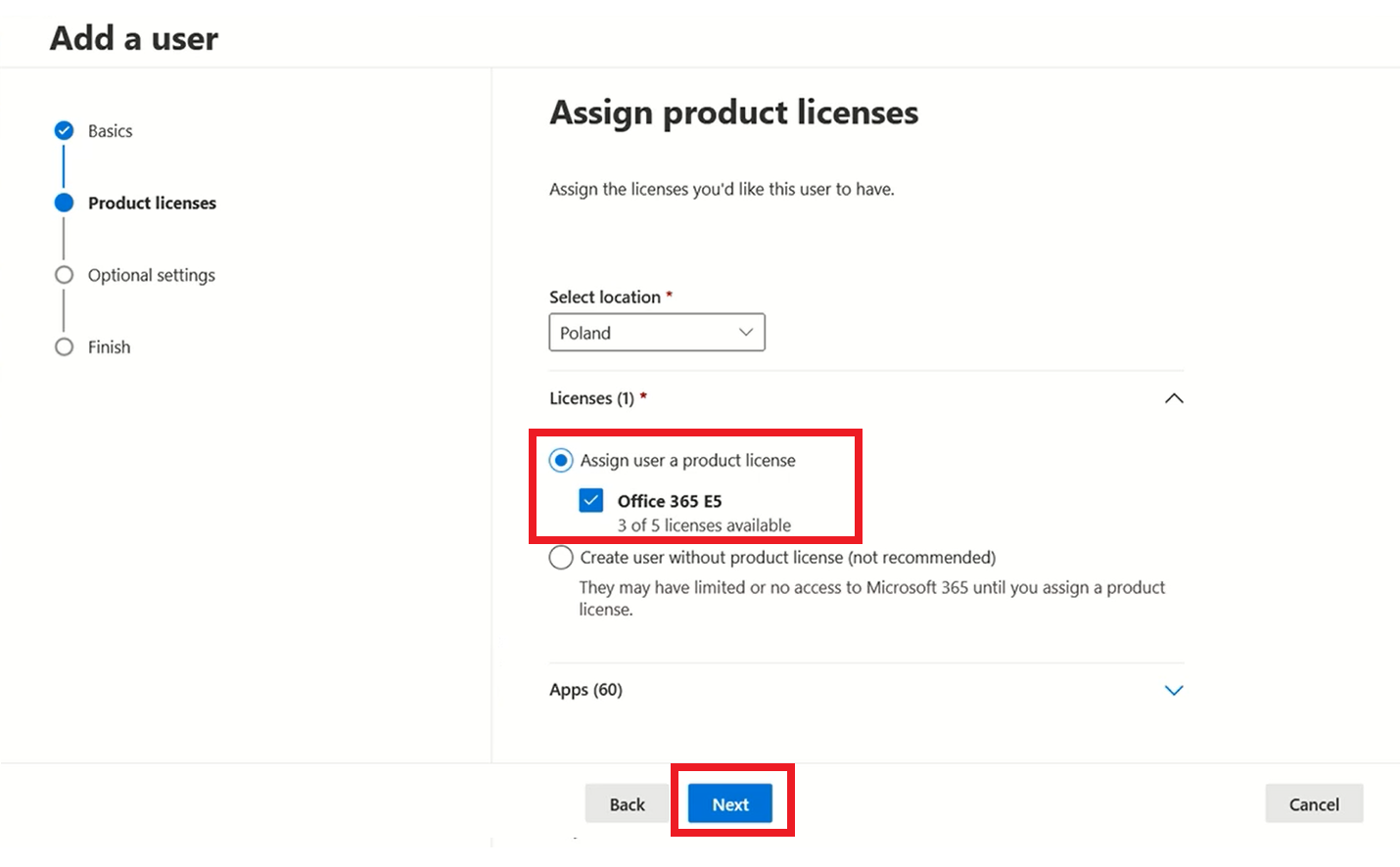
<span class="EOP SCXW150732740 BCX8" data-ccp-props="{"134245417":false,"335559685":3018}">**<span style="color: rgb(226, 68, 116);"> 4.</span>** <span class="ui-provider a b c d e f g h i j k l m n o p q r s t u v w x y z ab ac ae af ag ah ai aj ak" dir="ltr">Assign the user a license that includes **Microsoft Teams.** For example:</span></span>

- <span style="color: rgb(226, 0, 116);"><span style="color: rgb(0, 0, 0);"><span class="TextRun SCXW150732740 BCX8" data-contrast="none" lang="EN-GB" xml:lang="EN-GB"><span class="NormalTextRun SCXW150732740 BCX8">Microsoft </span><span class="NormalTextRun SCXW150732740 BCX8">365 E5</span><span class="NormalTextRun SCXW150732740 BCX8">, </span></span></span></span>
- <span style="color: rgb(226, 0, 116);"><span style="color: rgb(0, 0, 0);"><span class="TextRun SCXW150732740 BCX8" data-contrast="none" lang="EN-GB" xml:lang="EN-GB"><span class="NormalTextRun SCXW150732740 BCX8">M365 Business Basic</span></span><span class="TextRun SCXW150732740 BCX8" data-contrast="auto" lang="EN-GB" xml:lang="EN-GB"><span class="NormalTextRun SCXW150732740 BCX8">, </span></span></span></span>
- <span style="color: rgb(226, 0, 116);"><span style="color: rgb(0, 0, 0);"><span class="TextRun SCXW150732740 BCX8" data-contrast="none" lang="EN-GB" xml:lang="EN-GB"><span class="NormalTextRun SCXW150732740 BCX8">M365 Business Standard.</span></span></span></span>

[![image.png](https://bookstack.uc.t-mobile.pl/uploads/images/gallery/2023-11/scaled-1680-/HZ0image.png)](https://bookstack.uc.t-mobile.pl/uploads/images/gallery/2023-11/HZ0image.png)

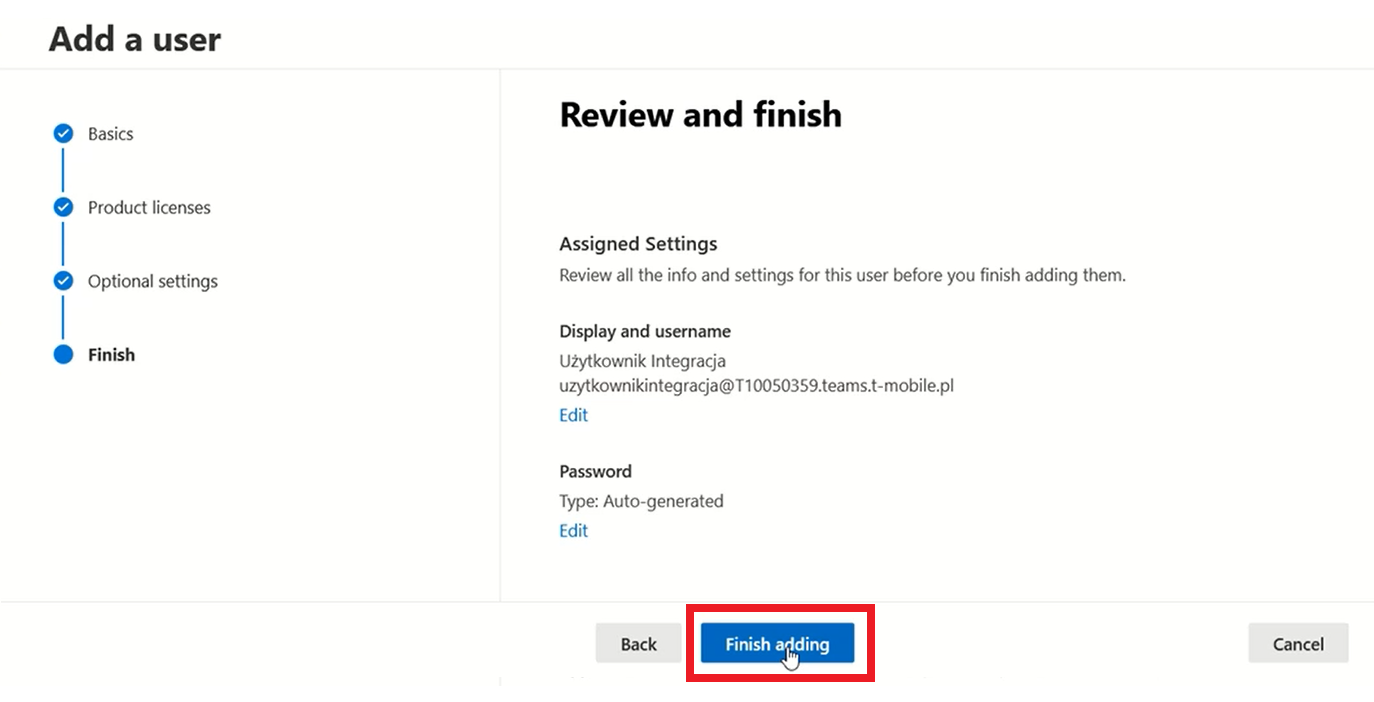
<span class="TextRun SCXW183439634 BCX8" data-contrast="auto" lang="PL-PL" xml:lang="PL-PL"><span class="NormalTextRun SCXW183439634 BCX8"><span style="color: rgb(226, 68, 116);">**5.**</span> <span class="ui-provider a b c d e f g h i j k l m n o p q r s t u v w x y z ab ac ae af ag ah ai aj ak" dir="ltr">Follow the next steps until the user creation is complete.</span></span></span>

[![image.png](https://bookstack.uc.t-mobile.pl/uploads/images/gallery/2023-11/scaled-1680-/Sncimage.png)](https://bookstack.uc.t-mobile.pl/uploads/images/gallery/2023-11/Sncimage.png)

<span class="ui-provider a b c d e f g h i j k l m n o p q r s t u v w x y z ab ac ae af ag ah ai aj ak" dir="ltr">Once you have finished adding the user, you can proceed to the next instruction.</span>